Regexes in Aliases
What Are Regex Aliases?
Use regular expressions to match patterns in email aliases and forward them dynamically. This lets you handle multiple similar addresses with a single rule.
A common pattern that you can set up easily:


Using substitutions
You can use $1, $2, etc. to insert
values matched by regex groups (parentheses) into the destination email address.
-
$1= first matched group,$2= second group, and so on. - This allows you to dynamically forward emails based on parts of the alias.
Example:
Let's say you have an alias defined as:


If someone sends an email to: john.doe@yourdomain.com
Result: The email forwards to: john.doe+john@gmail.com
Note: The alias field must not exceed 150 characters
Order of importance when matching an email
We evaluate alias matches in the following order of importance:
- The exact match
- The "Plus sign" match
- The Regex match
- The Wildcard or catch-all match
*
Regardless of how many aliases an email matches, only the highest priority rule activates.
Example:
Given these aliases:
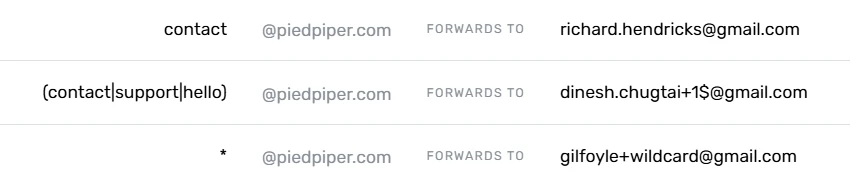
Even though contact@... matches multiple rules, the exact match i.e.
"richard.hendricks@gmail.com" takes priority.
Example email matches based on the above configuration:
- contact@piedpiper.com → richard.hendricks@gmail.com – Exact match
- support@piedpiper.com → dinesh.chugtai+support@gmail.com – Regex match
- postmaster@piedpiper.com → gilfoyle+wildcard@gmail.com – Wildcard match
- contact+jared@piedpiper.com → richard.hendricks+jared@gmail.com – Plus sign match
The "plus sign" match
When an email is sent to an address with a plus sign (e.g., contact+label@piedpiper.com), ImprovMX:
-
Matches it to the base alias (e.g.,
contact@piedpiper.com) -
Forwards to the configured destination (e.g.,
richard.hendricks@gmail.com) -
If the destination is a Gmail address, ImprovMX adds the same
+labelto the Gmail address
Example
Let's say you have the below forwarding setup:


Actual Email sent to: contact+newsletter@piedpiper.com
Final forwarded to: richard.hendricks+newsletter@gmail.com
ImprovMX strips the +newsletter when matching the alias, but re-applies
it to the Gmail destination for consistency.
Note: Only works for @gmail.com and other domains below, not for G-Suite domains.
List of accepted domains for Regex plus sign forwarding
- gmail.com
- hey.com
- protonmail.com
- icloud.com
- fastmail.com
- outlook.com
- runbox.com
- yandex.com
- yandex.ru
- mailfence.com
If you have any questions about regex forwarding, feel free to contact us.